Search pages turn product searches into real landing pages built from your feeds, for example /shop/zephyra-air-fryers. They target the searches shoppers actually type (a brand, a product type, or both) and stay current automatically as your feeds update.
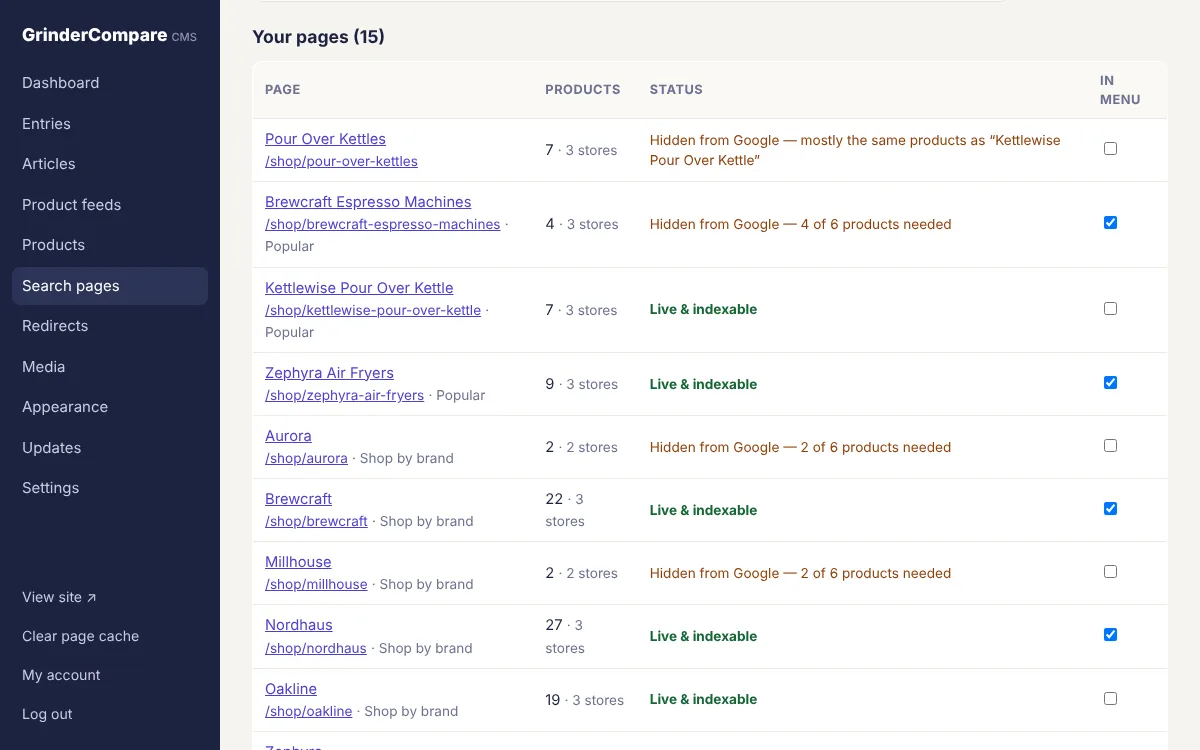
Admin → Search pages: each page’s product count and whether Google can see it.
Create pages
Open Admin → Search pages and either type a search (“zephyra air fryers”) and click Create page, or tick suggestions and click Create selected pages. Suggestions come from:
- What visitors searched for on your site in the last 90 days: real demand from your own audience.
- Brands in your feeds: one page per brand.
- Product types, from the feeds’ category field.
- Brand + product type: long-tail combinations with strong buying intent.
What each page contains
- A heading, SEO title and meta description (written for you from the data unless you set your own).
- A short intro generated from live data: number of products, stores, price range, typical price and the biggest current markdown. Add your own intro and a buying guide below the products to make the page stronger.
- A product grid where the same product from different stores is grouped into one card (by UPC/GTIN or part number), with each store’s price and a tracked “View deal” link.
- Automatic FAQ (cheapest option, which stores, which brands, how current the prices are) with FAQ structured data, plus ItemList and breadcrumb markup.
- Related pages that share words or a group.
Where they’re linked
- A Shop dropdown in the main menu for pages you tick “Show in menu” (up to 11 plus “See all”).
- An index page at
/shop, grouped by “Shop by brand”, “Shop by type” and so on. - A Popular row of links in the footer of every page.
- Shop related links on product reviews whose products match the page.
- The XML sitemap.
- Site searches that exactly match a page go straight to it.
Guardrails against thin and duplicate content
- Minimum products: a page is visible to Google only with at least 6 different products (change it in Admin → Search pages). Below that it stays live for visitors but is
noindex, left out of the sitemap and menu, and turns on by itself when your feeds grow. - One search, one page: searches are reduced to their meaning (lower case, singular, without words like “best”, “cheap” or “deals”) so “espresso machine” and “best espresso machines” can’t become two pages.
- Near-duplicates are folded in: if 85% or more of a page’s products are already on an older page, it points its canonical URL there and drops out of the sitemap. One click removes it and adds a 301 redirect.
- Site-search results stay hidden (
noindexand blocked in robots.txt), so random searches never create indexable URLs. - Changing a page’s URL adds a 301 redirect automatically.
Tips
- Brand + product type pages (“Zephyra air fryers”) usually rank fastest: specific, lower competition and high intent.
- Use Exclude words to keep accessories and parts out (“filter, replacement, refurbished”).
- Write 2-4 sentences of your own intro for your most important pages, and a short buying guide underneath.